

ENGLISH LEARNING GUIDE
How to turn English subtitles into vocabulary flashcards
Turn English subtitles into vocabulary flashcards without writing down each unfamiliar word. Use captions from a show, film or YouTube video, or paste text from an SRT/VTT file, to build a list at your level. Study the cards on your phone or export them to Anki.
The short answer: Paste English subtitle text into Scenelex or capture captions with the extension while watching. Choose the vocabulary levels you want to study and a maximum word count, then select “Create word list”. Repeated words are combined by base form; suitable words become flashcards with meanings and scene sentences. The steps below explain how to prepare the text and which words make it into the list.
Two ways to give Scenelex your English subtitles
- While watching, with the extension: works on YouTube, Netflix, Prime Video, HBO Max and TOD in Chrome on a computer. Install the Scenelex Companion extension, turn on English subtitles and watch. The extension only reads the subtitles the player loads for you; it does not separately download the video or its subtitle file.
- With your own text, no extension: open “Text & images” in the Scenelex web app and paste the text. It can be a show's transcript, song lyrics, an article or the contents of an SRT subtitle file on your computer. This route also works in your phone's browser.
Either way, a free Scenelex account is enough and no credit card is required. Scenelex does not provide a Netflix or other streaming subscription; you watch with your own account.
The screenshots below show the Turkish interface. You can use Scenelex in English; the vocabulary, definitions and example sentences are in English in either interface language.
Turn English subtitles into a vocabulary list in 5 steps
1. Turn on English subtitles or prepare your text
In the video player's subtitle menu, choose English and play the video. On YouTube, manually added English captions are used when available; otherwise auto-generated English captions work too. Subtitles in another language cannot produce an English vocabulary list, and the extension rejects subtitles in the wrong language.
If you already have a subtitle file, follow the SRT/VTT text preparation steps. You only need the English dialogue text; this route does not require the extension.
2. Check the captured subtitles or paste your text
Open the extension from Chrome's toolbar to see how many subtitle lines it has captured. You do not need to watch the whole episode; only the captured part is processed. If you are using text, drop it into the “Paste text” tab and optionally give the list a name.
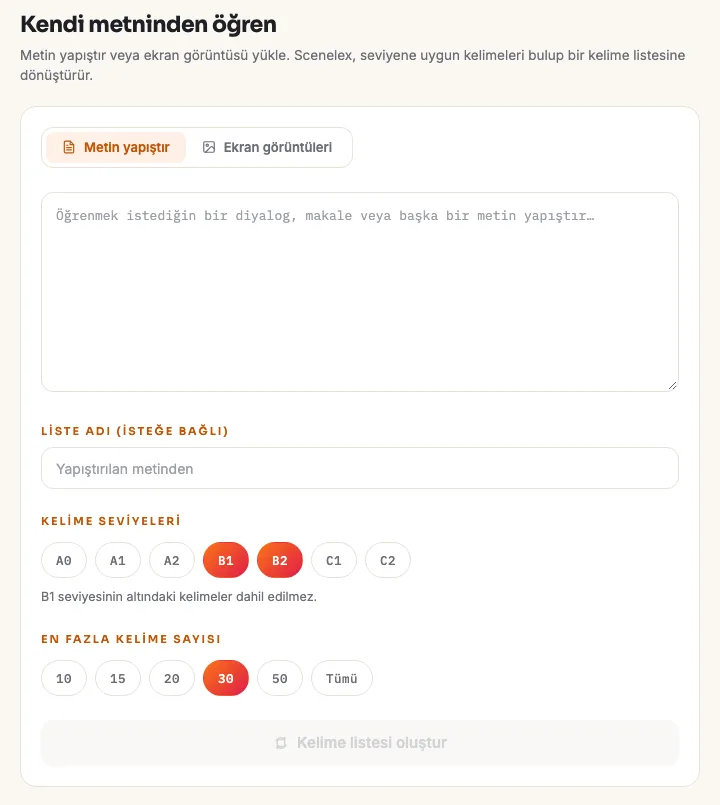
3. Choose word levels and a word count
Levels follow the Common European Framework of Reference (CEFR): A1, A2, B1, B2, C1 and C2, plus A0 for the most basic words. You can select more than one level; words at levels you leave out are not included. For the word count, choose 10, 15, 20, 30 or 50; “All” is available with Pro.
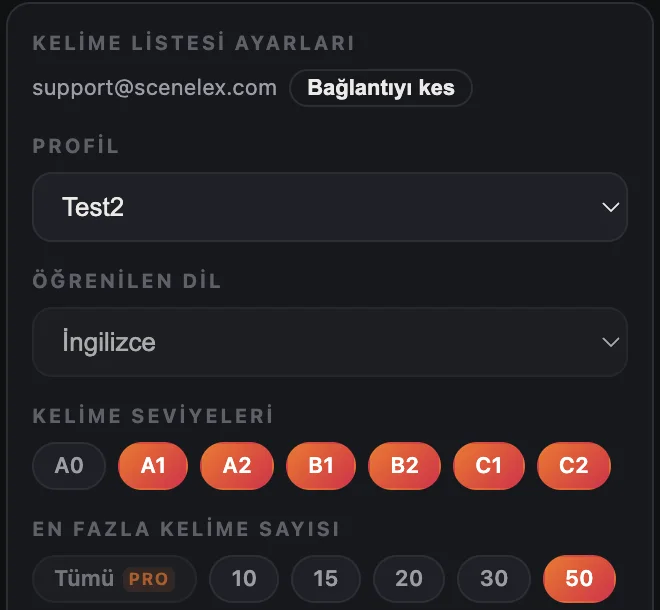
4. Create the word list
Select “Create word list” to send the subtitles for processing. Your word count is an upper limit: if the subtitles contain too few new words at your levels, the list will be shorter. Sending the same subtitles with the same settings opens the same list again; the selection is not random.
5. Review the list and study with flashcards
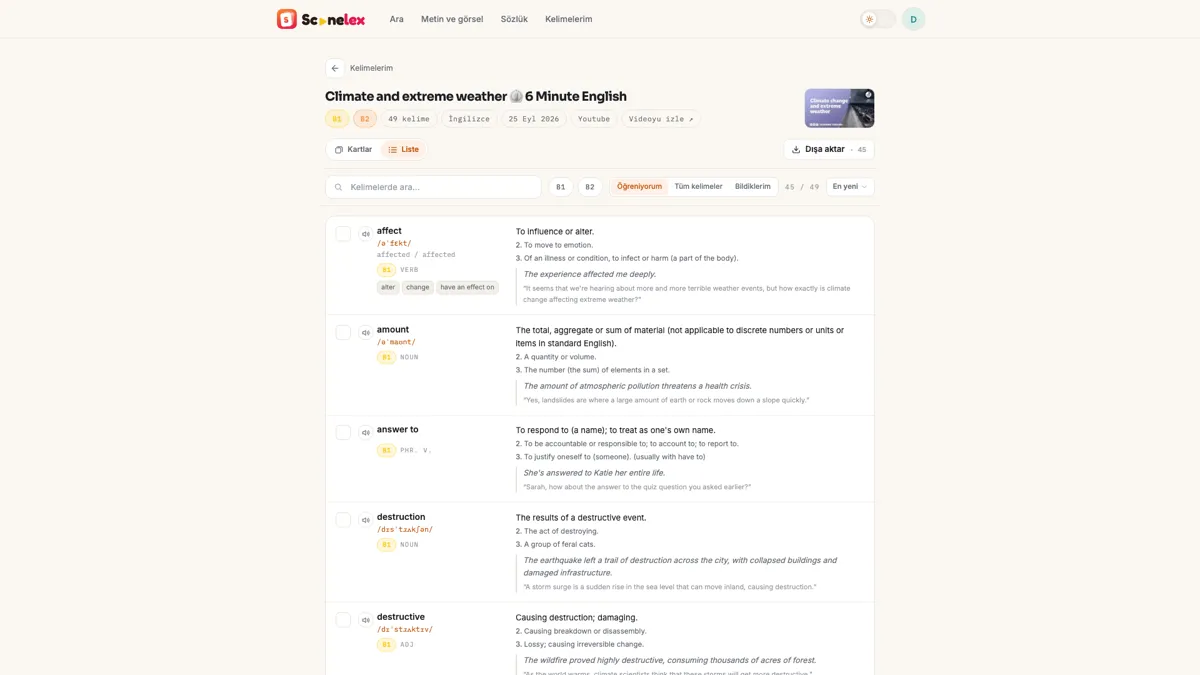
The list view shows each word's pronunciation, level, part of speech, meanings and subtitle sentence together. In the flashcard view, look at the word, try to recall its meaning, then flip the card. Mark words you already know as “I know it”; they will not appear in later lists for the same profile.
Extract vocabulary from SRT or VTT subtitle text
Scenelex does not have a subtitle file upload field; you use the text inside the file. Prepare it in three steps:
- Open the file in a text editor. Copy the English dialogue you want to study. For bilingual subtitles, keep only the English lines.
- Remove subtitle markers. Line numbers and timecodes do not count as words, but removing them keeps the sentence on the card easier to read. Also remove the
WEBVTTheader, formatting tags, speaker labels and sound descriptions such as [Music]. - Paste complete sentences. Join a sentence split across subtitle lines; avoid turning the dialogue into a list of isolated words. “Paste text” accepts up to 200,000 characters at once. Split longer text into scenes.
For example, keeping They gave up after the second attempt. as a complete sentence lets Scenelex consider give up together with its context. Which words become cards depends on your chosen levels and the words you already know.
Which subtitle words make it into your vocabulary list?
The hard part of building a vocabulary list from subtitles is not collecting every word, but finding the ones worth studying. Scenelex makes that choice with these rules:
- Words are reduced to their base form. affecting, affected and affects become a single affect card, and went counts as go. The same word never appears twice in one list.
- Phrasal verbs are detected separately. A sentence with gave up or giving up can produce a give up card. The individual words remain separate candidates too.
- Names, interjections and fragments are left out. Character names, place names and sounds such as uh-huh or shh do not become cards.
- Words you know are skipped. Words marked “I know it” in the same profile are left out of new lists, so each new episode brings only new vocabulary.
- Frequent and more advanced words come first. When there are more suitable words than your limit, words that repeat often in the subtitles and sit higher within your chosen levels are taken first.
Word levels come from the dictionary and AI-assisted classification. They describe how difficult a word generally is; they do not rate the whole show or measure your English.
How many words should you take from one episode?
As many as you can study in one sitting. If you are just starting, begin with 10 or 15 words; move to 20 or 30 once reviewing them feels manageable. The subtitles of a 45-minute episode can contain dozens of B1–B2 candidates, and trying to memorise them all on the same day makes review harder.
Subtitle lines, distinct words and flashcards are different counts. A word used 20 times in an episode still becomes one card. Removing known words and unselected levels makes the list shorter again, so choosing 50 words does not guarantee 50 cards from every text.
If you need help choosing content or levels, see the Netflix guide's content and vocabulary level suggestions. The steps here focus on turning your chosen subtitles into a list you can study.
Base forms, phrasal verbs and scene sentences in a real list
In the list above, the subtitle says affecting, while the card gives the base form affect and lists its forms separately. answer to became a card as a phrasal verb rather than a single word.
- Card
- affect · B1 · verb · affected / affected
- Meaning shown on the card
- To influence or alter.
- Original subtitle sentence
- “It seems that we're hearing about more and more terrible weather events, but how exactly is climate change affecting extreme weather?”
- Additional example for practice
- “The experience affected me deeply.”
A word seen in its own sentence is easier to remember than one read alone in a dictionary. When a word has several meanings, Scenelex puts the one that fits the scene first and lists the others below it. Context analysis is AI-assisted and can make mistakes; if a meaning does not fit the sentence, check the other meanings.
Studying English flashcards on your phone
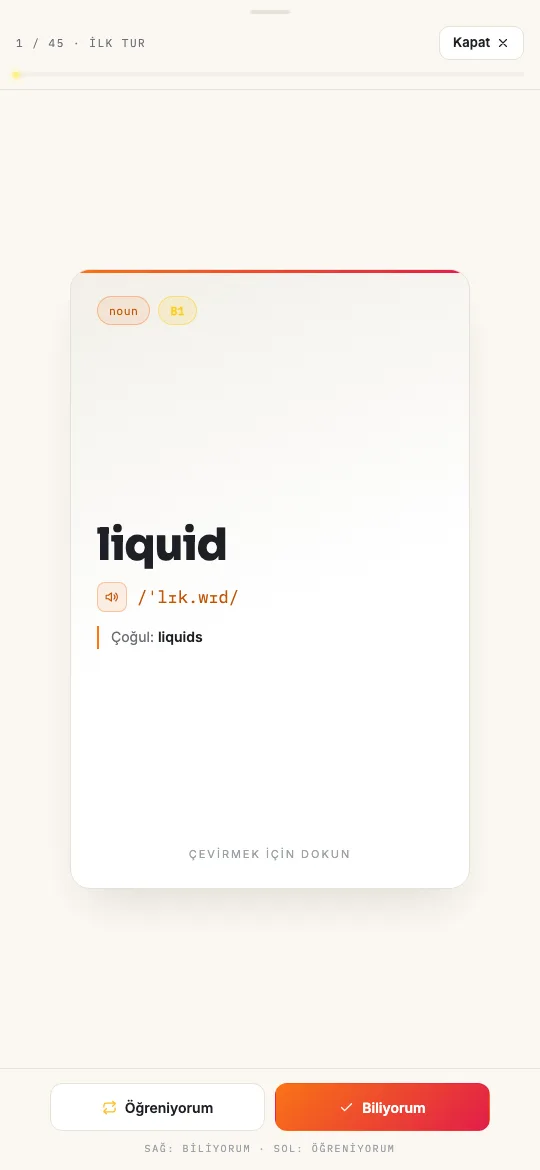
Even if you created the list on a computer, you can open and study the cards in your phone's browser; there is no separate app to install. Swipe right for “I know it” and left for “Still learning”. Cards marked “Still learning” come back in the next review round until you know them all.
Subtitles to Anki flashcards: export your vocabulary list
After creating a list from SRT text or captured captions, choose Anki (.csv) in the export menu. The file puts the word and its pronunciation, when available, on the front; meanings and example sentences go on the back. Check both fields in Anki's import preview. These are text-based vocabulary cards; the export does not include video or audio clips.
For Quizlet, the .txt option separates the word and definition with a tab, and cards with a new line. PDF and Word exports are also available. To export only words you find difficult, select the “Still learning” filter first; exports follow your current filter.
What can you do with the free plan?
Free includes up to 4 word lists per monthly usage period and up to 50 words per list. Pasting text, capturing subtitles with the extension, level selection, flashcard study and exports are all included. Free is not a time-limited trial.
For more than 50 words per list, Pro offers the “All” option. See the Free and Pro plan comparison for current usage allowances and other features.
What if your vocabulary list is not what you expected?
- The list is very short: the captured subtitles may be short, or there are too few new words at your levels. Add another level or watch a little more of the video.
- Every word is already known: you have marked all suitable words in these subtitles as “I know it” in this profile. Choose other levels or try different content.
- The extension is waiting for subtitles: turn on English subtitles and play the video; opening the extension alone does not capture text. On YouTube, make sure you are on the video's watch page.
- The list has odd words: your pasted text may still contain tags such as [Music] or speaker names; remove them and try again.
If the problem continues, contact support. Do not send passwords or payment details.
Frequently asked questions
Can I upload an SRT or VTT subtitle file?
You cannot upload the file directly. Open it in a text editor and copy the English dialogue into “Paste text”. The SRT/VTT preparation section explains which markers to remove and the text limit.
Can I make a vocabulary list from YouTube's auto-generated captions?
Yes. If a video has no manually added English captions, auto-generated English captions can be used. Auto-generated captions may contain spelling mistakes, so it is worth reviewing the list.
Are the word meanings translated into my language?
No. Meanings and example sentences are in simple English, which helps you think about the word without relying on translation. The interface is available in English and Turkish.
What happens if the same word appears in two lists?
Each list keeps its own cards, but the word appears once in your “My words” collection. If you have marked a word “I know it”, it stays out of new lists, and seeing it again in another video does not undo that.
Is the subtitle text stored?
Raw subtitles are not kept as a permanent archive; the raw server-side content is deleted when processing completes. Your flashcards and the scene sentences on them remain in your account. See the privacy policy for details.
Which platforms can the extension capture subtitles from?
The extension works on YouTube, Netflix, Prime Video, HBO Max and TOD. For other sources you can paste the text; creating lists from screenshots is a Pro feature. See supported platforms for the current list.
Create your first subtitle word list
Open a video with English subtitles or paste some text, choose your levels and start with 10 words.
Start for freeNo credit card required. Pasting text does not need the extension.
Explore next: Learn English with Netflix · All English vocabulary learning guides