

ENGLISH LEARNING GUIDE
Learn English with Netflix: from subtitles to flashcards
Watch with English subtitles, choose words to study and review their meaning in the scene. Follow a practical Netflix workflow, from setting up Scenelex to studying your flashcards.
The short answer: Watch Netflix on your computer with English subtitles. In the Scenelex extension, select the vocabulary levels you want to study and a word count, then click “Create word list”. Scenelex prepares flashcards from the captured subtitles. Open them in the app to study the words with their scene-specific meanings and examples.
What do you need to get started?
- Chrome on a computer and a free Scenelex account.
- The Scenelex Companion Chrome extension.
- Your own access to Netflix and a title with English subtitles. Scenelex does not provide a Netflix subscription or unlock content.
Creating a word list from video subtitles requires a computer. Once created, your flashcards are also available in your phone's browser; you do not need a separate mobile app.
The screenshots below show the Turkish interface. You can use Scenelex in English; the vocabulary, definitions and example sentences are in English in either interface language.
Create flashcards from Netflix subtitles in 5 steps
1. Install the extension and sign in to Scenelex
Add the extension from the Scenelex Companion Chrome Web Store listing. Open the Scenelex web app in the same Chrome profile and sign in. Return to your Netflix tab and check that the extension shows your connected Scenelex account.
2. Turn on English subtitles in Netflix
Start the video, open the player's audio and subtitles menu, and select English subtitles. The option may appear as English or English [CC]. For listening practice, choose English audio too, when available. If you cannot find the setting, see Netflix's audio and subtitles instructions.
Keep watching normally. The extension captures subtitles loaded by the player during playback; it does not separately download the video's entire subtitle file. Creating a word list starts only when you select “Create word list”.
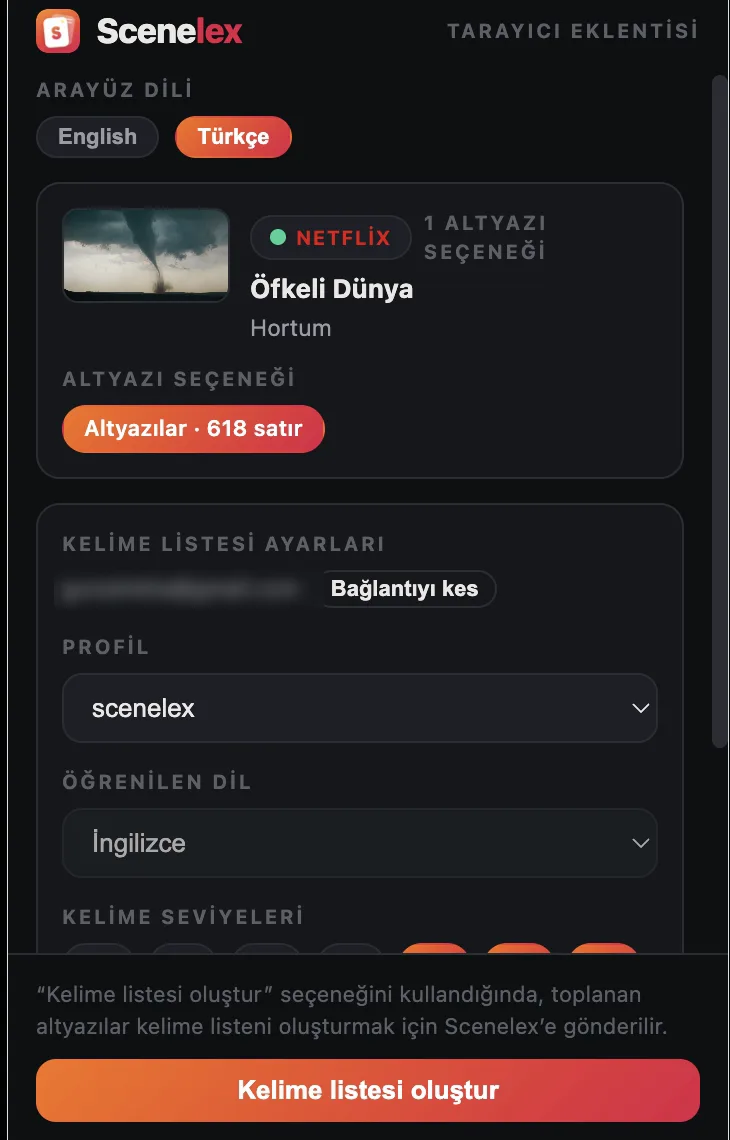
3. Choose word levels and a maximum word count
Open the extension from Chrome's toolbar. Select the Scenelex profile to save words to, the vocabulary levels you want to practise and the maximum number of words. You can choose more than one level. Scenelex does not make this choice for you; these settings are not a placement test.
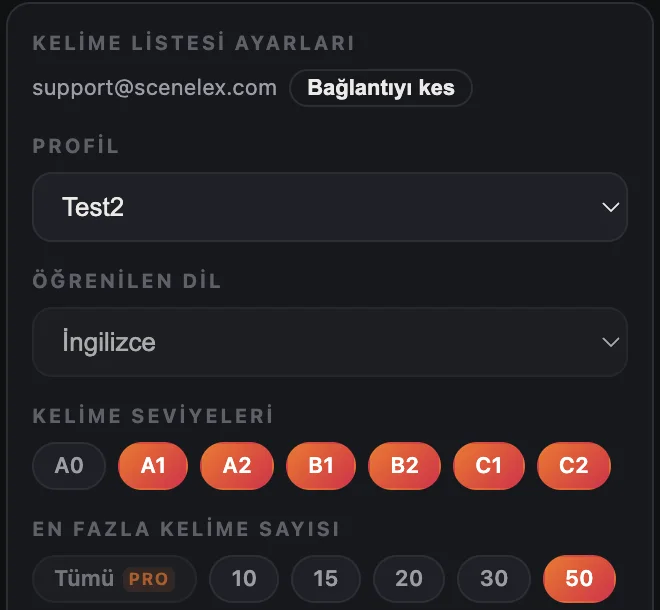
4. Create your word list
Select “Create word list” to send the captured subtitles to Scenelex for processing. It selects words at your chosen levels and filters out words marked “I know it” in the same profile. Dictionary information and AI-assisted context analysis are used to prepare the cards.
Processing time depends on the subtitles and service demand. Your word count is an upper limit: if there are fewer suitable words in the captured text, your list may be shorter.
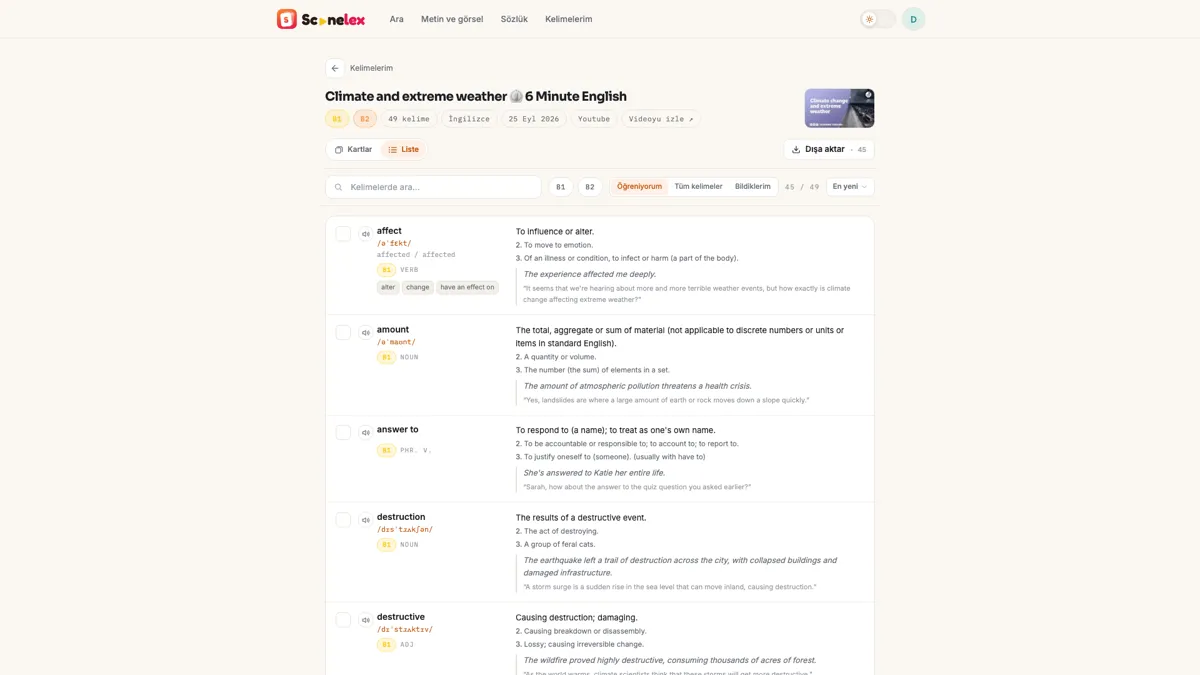
5. Study your flashcards and return to them later
Look at the word and try to recall its meaning before flipping the card. Cards show the meaning and, where available, pronunciation, an example sentence and the word's use in the scene. Other meanings, synonyms and common word combinations are included when available.
You decide whether to mark a word “I know it” or “Still learning”. Return to difficult words in your next study session; finishing a list does not necessarily mean you have learned every word.
A short routine for studying English with Netflix
A show can help you connect the English you hear with the words you read. Watching an episode alone does not ensure that you will remember its vocabulary or use it in conversation. Add short reviews to your watching routine, alongside speaking and writing practice.
Try this small routine for your first session. The times and word counts are starting suggestions, not targets you must meet:
- Watch a 5–10 minute section. Use English audio and subtitles where available. Follow the scene before stopping at every unfamiliar word.
- Start with a 10-word list. Focus on words you are curious about or want to use yourself. You do not have to finish every card in one sitting.
- Return to the sentence. Check how the word is used in the scene, rather than learning an isolated definition. Try writing a short sentence of your own.
- Review the next day. Recall the meaning before flipping the card. Revisit difficult words a few days later; increase your next list size if it feels manageable.
Which Netflix title and vocabulary levels should you choose?
Rather than following a fixed “best shows” list, choose something that interests you and whose main idea you can follow with subtitles. An episode you have already watched may let you focus less on the plot. For everyday conversation, try scenes about family or friends; for a particular interest, try a documentary on that subject.
- If basic words are still difficult: Start with A1–A2 words and a short scene. The app also includes an A0 label for beginner vocabulary.
- If you follow the main idea but miss some expressions: Try B1–B2 words and include more basic levels if the list feels too difficult.
- If you want more advanced vocabulary: Try C1–C2. How useful these words are depends on your goals and the topic, not just their level.
These are word levels, not a rating of the whole show or a measurement of your English proficiency. If every sentence is difficult, choose a more familiar title or a shorter section. Once reviewing 10 words feels manageable, try a list of 15 or 20.
For details on how repeated words are combined and which words are left out, see the guide to extracting vocabulary from subtitles.
A real flashcard: what does “surge” mean in this scene?
A word's first dictionary meaning does not fit every sentence. In the real card below, surge appears in a subtitle about a storm. The main definition describes a sudden rush or increase; an electrical meaning is listed separately.
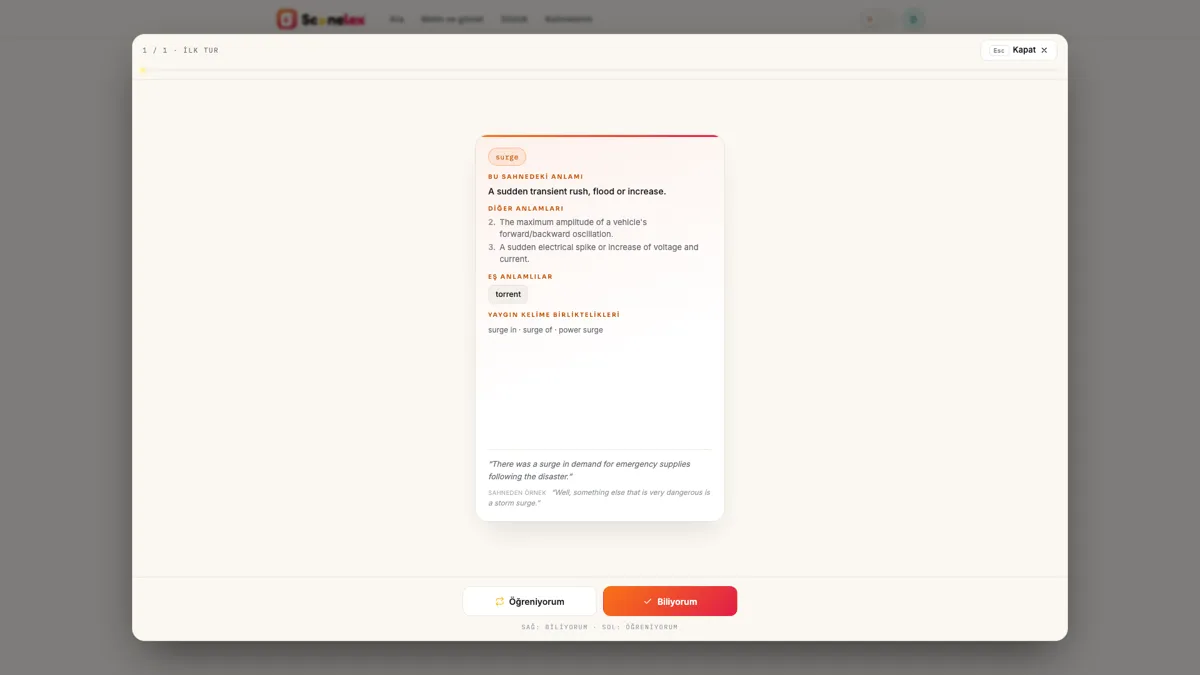
- Meaning shown on the card
- A sudden transient rush, flood or increase.
- Original subtitle sentence
- “Well, something else that is very dangerous is a storm surge.”
- Additional example for practice
- “There was a surge in demand for emergency supplies following the disaster.”
Scenelex considers dictionary meanings alongside the sentence. AI helps select a suitable meaning and fill missing card information with examples when needed; not every card is generated from scratch. Context analysis can make mistakes, so check the sentence and other meanings if the definition does not seem to fit.
Export your Netflix vocabulary to Anki or Quizlet
You do not have to study your cards in Scenelex. Open your word list's export menu and choose Anki, Quizlet, PDF or Word.
- Anki: Download the CSV file and import it into Anki. Match the front field to the word and the back field to its meaning and examples; check both fields in the import preview.
- Quizlet: Paste the exported text into the import field. Terms and definitions are separated by tabs, with one card per line; check the preview before continuing.
- PDF or Word: Download a copy for offline study or your own notes.
What can you do with the free plan?
Free includes up to 4 word lists per monthly usage period and up to 50 words per list. Level selection, flashcard study and exports are included. Free is not a time-limited trial, and no credit card is required.
Pro increases your usage allowance, removes the 50-word per-list cap and adds dictionary and screenshot-based word list features; it does not mean unlimited usage. See the Free and Pro plan comparison for current allowances and prices.
What if subtitles or vocabulary do not appear?
- No subtitles in the extension: Check that you are using Chrome on a computer and the extension is enabled for Netflix. Turn on English subtitles and play the video for a while; opening the extension alone does not capture text.
- No English subtitle option: Try a different title or check Netflix's explanation of language availability. Not every title has the same subtitle languages.
- Your account is not connected: Sign in to the Scenelex web app in the same Chrome profile, then reopen the extension.
- Your list is shorter than expected: The captured subtitles may contain too few new words at your chosen levels. Check your level selection and the words you have marked “I know it” in that profile.
If the problem continues, contact Scenelex support with the error message. Do not send passwords or payment details.
Frequently asked questions
Should I use English subtitles or subtitles in my own language?
Scenelex needs English subtitles to create English vocabulary cards. Subtitles in your own language can help you follow the story, but they do not show the written English words. If English subtitles feel too difficult, try a shorter section of a scene you already know.
Does it work while watching Netflix on a phone or TV?
Subtitle capture works through the Chrome extension on a computer, not inside Netflix's phone or TV apps. You can study lists created on your computer in your phone's browser.
Does Scenelex ask me to sign in to my Netflix account?
No. Sign in to Netflix on Netflix's own site; do not give your Netflix password to Scenelex. The account you connect in the extension is your Scenelex account. Scenelex is independent and is not affiliated with Netflix.
Is the subtitle text stored?
Raw subtitles are not kept as a permanent archive. When you choose to create a list, the text is sent for processing, and the raw server-side content is deleted when the job completes. Your vocabulary cards and the scene sentences included in them remain in your account. See the privacy policy for details.
Do I need to watch the whole episode first?
No. You can create a list once the extension has captured usable English subtitles. Only the captured text is processed; a short section or a narrow level selection may produce fewer words.
Does Scenelex only work with Netflix?
YouTube, Prime Video, HBO Max and TOD are also supported. You can paste English text into the app without the extension. Creating lists from screenshots is a Pro feature; see supported platforms and plans for current options.
Create your first short word list
Choose a scene with English subtitles, select the word levels you want to practise and start with 10 words.
Start for freeNo credit card required. Video subtitles need Chrome on a computer and Scenelex Companion.
Explore next: Subtitles to vocabulary flashcards · English vocabulary learning guides · How Scenelex works